

10 Underrated React Hooks You’re Probably Not Using Yet
Since React 16.8 was released, hooks have become the backbone of modern React front-end development, enhancing the use of functional components instead of classes. However, most developers barely move beyond the two popular useState and useEffect hooks.
While it is true that the aforementioned hooks could serve for general purposes, the truth is that React’s ecosystem hides a collection of lesser-known hooks that can significantly improve performance, readability, and scalability.
In this React hooks tutorial, we’ll explore 10 React hooks you didn’t know existed. We’ll go over when to use them, provide brief code samples, and demonstrate how React 19 keeps enhancing hooks’ functionality. No matter if you’re starting from scratch to construct a new app or you’re seeking how to improve React performance with lesser-known hooks, this article will give you a clear overview of the real power behind the use of such hooks.
Why Hooks?
React hooks are intended to simplify the way we handle state and side effects in functional components. Instead of juggling lifecycles or HOCs, hooks allow developers to reuse logic and keep components small and expressive.
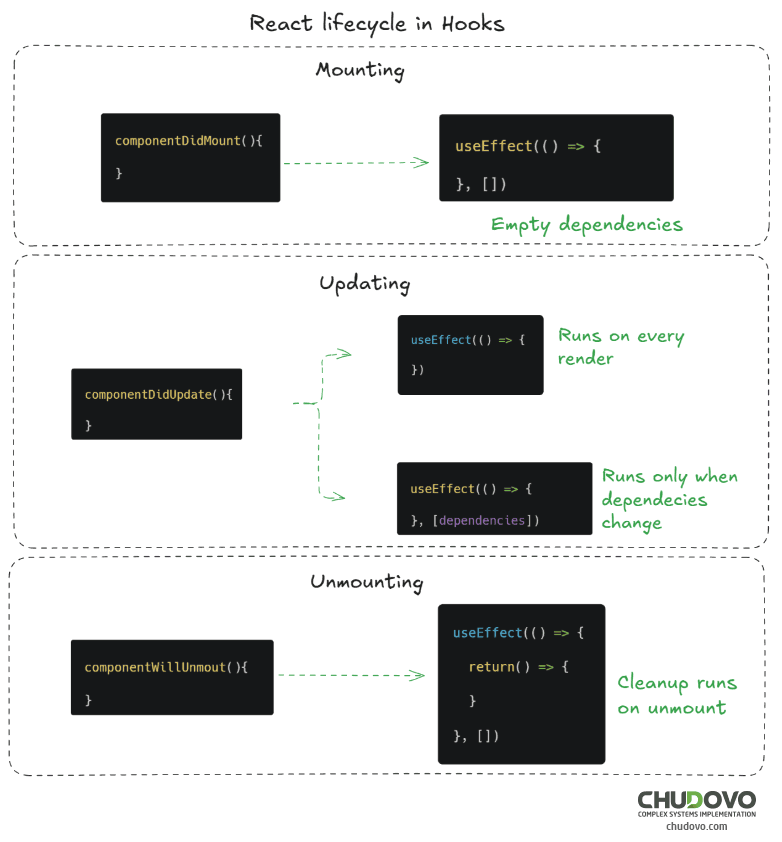
As React continues to evolve, this philosophy becomes more and more robust. React’s team is constantly working to improve concurrent rendering, introducing better transitions, and exploring advanced React hooks to be introduced in future releases.
Let’s now dive into some underrated React hooks that you can use to leverage your React application.
1. useLayoutEffect: The Synchronized Side Effect
There are developers who shy away from using useLayoutEffect out of fear it could block the UI (we’ll see why in just a second). The fact is, if you use it right, this hook could save you from a lot of sneaky layout bugs.
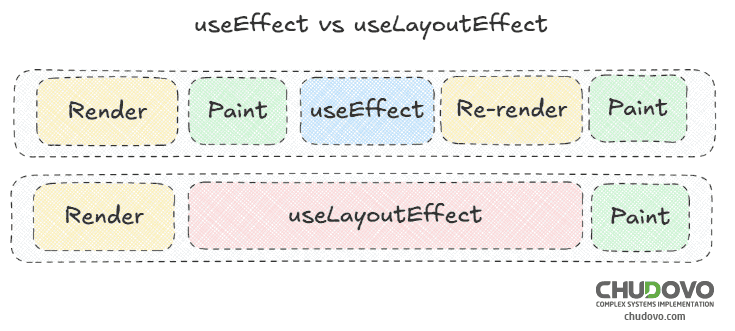
Let’s start by comparing useLayoutEffect with the better-known useEffect. Probably you might know that useEffect is used to perform side effects that run after the browser paints. Instead, useLayoutEffect fires in sync with all the DOM mutations before paint, which makes this hook ideal for measuring or mutating layout values.
Let’s take a look at the code below:
import { useLayoutEffect, useRef, useState } from "react";

function Tooltip() {
  const ref = useRef(null);
  const [width, setWidth] = useState(0);

  useLayoutEffect(() => {
    if (ref.current) setWidth(ref.current.offsetWidth);
  }, []);

  return <div ref={ref}>Tooltip width: {width}px</div>;
}
In this example, the width of the tooltip is being applied directly before its content is “painted” to the screen (i.e, just before it is shown to you as the rendered element). This allows us to prevent “jumping” effects, which are commonly observed when using useEffect.
The trade-off, as you may have guessed, is that – given the effect is triggered before the painting – the UI will be blocked until the code inside useLayoutEffect is properly executed. So, the rule of thumb would be to use this hook wisely, mainly for layout calculations, animations, or synchronization tasks that actually must happen before the screen updates.
2. useRef: The Hidden Keeper
Usually, developers use this hook to access DOM nodes by providing the ref to a specific JSX element, such as an input. Later on, such a ref can be used to interact with the node in an imperative way.
Despite this well-known use case, useRef’s real power is allowing you to store mutable values that persist across renders without triggering a re-render. This makes useRef one of the most underrated hooks.
Here’s how it works:
import { useRef, useEffect } from "react";

function Timer() {
  const count = useRef(0);

  useEffect(() => {
    const interval = setInterval(() => {
      count.current += 1;
      console.log("Seconds elapsed:", count.current);
    }, 1000);
    return () => clearInterval(interval);
  }, []);

  return <p>Open your console to see the timer running!</p>;
}
Here, count can be thought of as a sort of hidden variable that React doesn’t keep track of. Finally, a value inside such a variable can be updated: it does not need to re-render the UI because it will only store the new value in reference. Considering this, useRef is succinct for holding onto previous values, managing timeouts, and making stable references without triggering renders.
3. useImperativeHandle: Managing the Exposure, Your Way
As I covered above, we can use useRef to directly manipulate the DOM. But in some cases, you may want to hide the component’s internal structure, keeping just a small piece of interaction from the parent. That’s where useImperativeHandle can be a great choice.
This hook can be used to:
- i) Control the value that is returned by a given reference. For example, instead of returning the instance element, you explicitly state what the return value for such a reference is:
import { useImperativeHandle, useRef } from "react";

const Modal = ({ ref }) => {
  const dialogRef = useRef();

  useImperativeHandle(ref, () => ({
    open: () => dialogRef.current.showModal(),
    close: () => dialogRef.current.close(),
  }));

  return <dialog ref={dialogRef}>Hello World</dialog>;
};
In this example, the <Modal> component will expose (from its ref) the open and close methods instead of the entire instance of the dialog element.
- ii) Override native functions (such as blur, focus, etc.) with functions of your own, allowing side effects to the normal behavior or a different behavior altogether.
import { useState, useRef, useImperativeHandle } from 'react';

const MyInput = ({ ref, ...props }) => {
  const [val, setVal] = useState("");
  const inputRef = useRef();

  useImperativeHandle(ref, () => ({
    blur: () => {
      // Additional side effect
      document.title = val;
      // Blur the input element
      inputRef.current.blur();
    }
  }));

  return (
    <input
      ref={inputRef}
      val={val}
      onChange={e => setVal(e.target.value)}
      {...props}
    />
  );
}
In this example, the parent component will access a custom blur method that combines a side effect with the default input’s behavior.
4. useReducer vs useState: Smart State Management
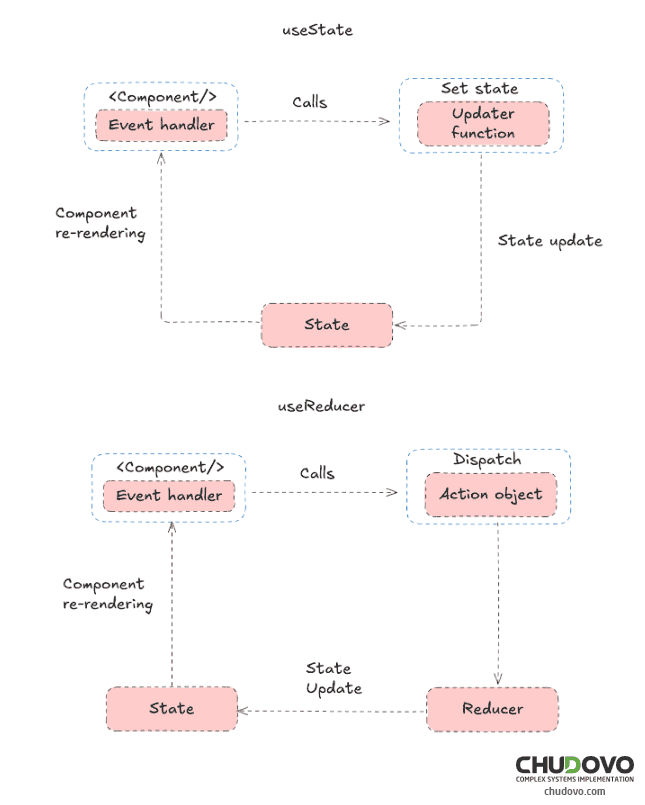
A basic approach while using state management hooks is to add more instances of useState for each of the specific states you want to maintain. But as your application grows, your state is going to become more complex. This is where useReducer helps.
useReducer is inspired by the Redux pattern, where state management is constructed around dispatching actions and processing them in a single reducer function. While Redux in the abstract sense is not a hook, its way of thinking inspired some of the best React hooks for complex state management that enjoyed immense popularity throughout the React community.
There are two primary arguments for this hook:
- A function that specifies how the state is updated in response to an action being dispatched.
- The initial state.
useReducer returns two values: the current state and a function that triggers actions to update the state.
function counterReducer(state, action) {
  switch (action.type) {
    case "increment":
      return { count: state.count + 1 };
    case "decrement":
      return { count: state.count - 1 };
    default:
      return state;
  }
}

function Counter() {
  const [state, dispatch] = useReducer(counterReducer, { count: 0 });

  return (
    <>
      <p>{state.count}</p>
      <button onClick={() => dispatch({ type: "increment" })}>+</button>
      <button onClick={() => dispatch({ type: "decrement" })}>-</button>
    </>
  );
}
Unlike useState, it centralizes logic and keeps components predictable. As soon as your component’s logic begins to have altered branches with several useState calls, you can refactor it to useReducer, which is easier to maintain and test.
5. useCallback: Preventing Useless Re-Renders
Performance optimization is one of the most exciting topics in modern web development, as improving performance results in a better user experience. And as your app grows more complex, this matters even more. One of the performance optimization hooks provided by React is useCallback. This way, you can register which functions to reconstitute each time your component updates, avoiding useless re-renders.
function ProductPage({ productId, referrer, theme }) {
  const handleSubmit = (orderDetails) => {
    post('/product/' + productId + '/buy', {
      referrer,
      orderDetails,
    });
  }

return (
    <div className={theme}>
      <ShippingForm onSubmit={handleSubmit} />
    </div>
  );
}
In the example above, we create a ProductPage component that displays a shipping form. useCallback takes as its first parameter a function, and as its second, an array of dependencies. Let’s assume ShippingForm is an expensive component, so we have memoized it to prevent unnecessary re-renders, as long as its props do not change.
import { memo } from 'react';

const ShippingForm = memo(function ShippingForm({ onSubmit }) {
// ...
});
Do you want to hear the tricky part? Here it goes: as the handleSubmit function is declared inside ProductPage’s body, such a function will be recreated each time one of the component’s props changes.
So, should the user decide to change the theme, React will recreate the function, and such a change will trigger a re-render of the ShippingForm component. To prevent this, useCallback comes to the rescue.
This hook returns a memoized version of the provided function, which will only be recreated if any of its dependencies change.
Here’s how to wrap the handleSubmit function inside a useCallback hook.
const handleSubmit = useCallback((orderDetails) => {
  post('/product/' + productId + '/buy', {
    referrer,
    orderDetails,
  });
}, [productId, referrer]);
Now, this memoized version of the callback will be equal through each of the re-renders of ProductPage, as long as none of the dependencies (the values that are wrapped in the array) has changed.
In this way, useCallback helps to prevent performance problems related to unnecessary recreation and re-renders of child components that rely on these functions by means of memoization.
6. useMemo: Caching Expensive Computations
Similar to useCallback, the useMemo hook also uses a memoization technique to optimize performance in React applications. But instead of memoizing things like a function, this hook is memoizing the result of some computation. So, if dependencies are unchanged, the memoized value will be returned across all subsequent re-renders. If it does, the hook will recalculate the value and cache the new one.
This hook is handy in cases when our code must do some heavy lifting, like sorting a long list of items.
const sortedItems = useMemo(() => sortItems(veryLongListOfItems), [veryLongListOfItems]);Memoization, however, is not free. So, following the React hooks best practices, you must use this hook when recomputing is more expensive than memoization, and it would be worth it to keep the previous value by comparing it with the current one.
7. useDeferredValue: Making Expensive Renders Feel Instant
Software developers often need to perform expensive computations in response to user input. This hook is new to React 18 and quite possibly one of the least-known React hooks. It gives the developer a way to postpone a value’s calculation until the more critical portions of the UI finish updating. In some cases, useDeferredValue is a fantastic way to help create responsive user interfaces that don’t get bogged down by slow components in less important areas of the UI.
Let’s see how this hook works.
import React, { useState, useDeferredValue } from 'react';

const SearchComponent = () => {
const [query, setQuery] = useState('');
const deferredQuery = useDeferredValue(query);

const handleChange = (event) => {
  setQuery(event.target.value);
};

return (
  <div>
    <input
      type="text"
      value={query}
      onChange={handleChange}
      placeholder="Type your search query"
    />
    <SearchResults query={deferredQuery} />
  </div>
);
};
In the example above, our app renders two UI components: an input and the list of results based on the input’s value. While typing on the input, the user expects the characters to appear on the screen immediately, while the update of the results could be deferred for some time (which actually feels “natural”).
By using useDeferredValue, we let React prioritize rendering the input field and delay the rendering of SearchResults until a low-priority update cycle. This helps to keep the user’s ability to type smoothly, preventing any kind of delay that the rendering of the result list component may cause.
8. useTransition: Managing UI States Gracefully
Where useDeferredValue defers a value, useTransition defers a state update. It allows you to mark updates as non-urgent, improving fluidity in heavy UI transitions.
import { useState, useTransition } from "react";

function Gallery() {
  const [isPending, startTransition] = useTransition();
  const [tab, setTab] = useState("photos");

  const handleTabChange = (nextTab) => {
    startTransition(() => setTab(nextTab));
  };

  return (
    <>
      {isPending && <p>Loading...</p>}
      <Tabs current={tab} onChange={handleTabChange} />
    </>
  );
}
useTransition returns a “loading” boolean as the first argument and a function as the second. Inside the function, we’ll do the state update, which will be calculated in the “background” without blocking the UI. So we can use this boolean to add a loading state if we are waiting for that update. This tells the user that something is going on, making a nice user experience.
Because React is able to inform which state changes are transitional, it can commit interactions first and keep perceived danceability in complex UIs.
9. useOptimistic: Seamless User Experience Through Instant Feedback
Announced as part of React 19 hooks, useOptimistic is a simple, yet incredibly exciting, new feature for handling optimistic UI updates. The concept behind this hook is straightforward: we make an optimistic assumption, update the UI right away, and allow the server to catch up at a later point. If something goes wrong, do the rollback.
In most cases, optimistic updates feel smooth, and there is no rollback, so this approach is commonly used to manage updates that require asynchronous requests.
Before, you would have had to manually juggle state with useState or useReducer. But surprise, thanks to the useOptimistic hook, we can workaround it in a very simple way.
import { useOptimistic } from "react";

function CommentForm({ sendComment }) {
  const [optimisticComments, addOptimisticComment] = useOptimistic(
    [],
    (state, newComment) => [...state, { text: newComment, optimistic: true }]
  );

  const handleSubmit = async (e) => {
    e.preventDefault();
    const text = e.target.comment.value;
    addOptimisticComment(text);
    await sendComment(text); // Simulate network call
  };

  return (
    <>
      <form onSubmit={handleSubmit}>
        <input name="comment" placeholder="Write a comment..." />
        <button type="submit">Send</button>
      </form>
      <ul>
        {optimisticComments.map((c, i) => (
          <li key={i}>{c.text}</li>
        ))}
      </ul>
    </>
  );
}
This example renders the comment instantly, even before the network request finishes. Once the server responds, the confirmed state will replace the optimistic one, providing a seamless user experience.
10. Custom Hooks: The Hidden Superpower
Finally, don’t forget that you have custom React hooks. These are ideal for reusing logic in a more remarkably elegant way. You could also create your utility as a modular one that uses some of the built-in hooks.
function useLocalStorage(key, initialValue) {
  const [value, setValue] = useState(() => {
    const saved = localStorage.getItem(key);
    return saved ? JSON.parse(saved) : initialValue;
  });

  useEffect(() => {
    localStorage.setItem(key, JSON.stringify(value));
  }, [key, value]);

  return [value, setValue];
}
This useLocalStorage hook is combining persistence and state in a way that many production React applications would be doing.
You can build tooling customized for your project by compiling advanced React hooks like useLayoutEffect, useReducer, and useCallback.
How to Use Underrated React Hooks
These are some React hooks tips, which you can keep in mind while using the hooks from this article:
- Only use ‘underrated ‘ hooks when necessary to address real performance or readability concerns.
- Don’t serve hook soup: keep reasoning together in the same hook.
- Always review dependency arrays for correctness.
- Use custom React hooks for reusability and consistency throughout your app.
- As for what’s next, keep your ear to the ground with React 19 hooks best practices and community RFCs.
Conclusion
Many React developers are unaware of how deep the hook system goes; however, there is much beyond the basic hooks. Going beyond what’s widely known can lead to solutions that are more efficient and easier to read, and in this post, we have presented a list of hidden React hooks every developer should try and use as part of React development services.
You’ve read it; now it’s your move. Only release one at a time. Let’s, for instance, add useLayoutEffect or useDeferredValue and see what the app does. With time, learning these advanced React hooks for modern apps will help you up your game and make React applications smoother, faster, and easier to manage.