

Build a Full-Stack .NET + React CRUD App: Step-by-Step Tutorial
CRUD apps may look simple, but they force developers to solve the same integration challenges found in real production systems: API design, data persistence, front-end state management, and cross-origin communication.
In this guide, you’ll learn how to build a CRUD app with .NET and React to implement a simple Create, Read, Update, Delete workflow. For this purpose, this full-stack .NET React tutorial will combine the use of ASP.NET Core Minimal APIs for the back-end with a powerful React + Vite application for the front-end. You’ll also have the opportunity to discover some architectural patterns and best practices followed by most development teams while building a full-stack application.
By following the steps below, you’ll have a working ASP.NET Core React CRUD example and a clear understanding of how to connect a React front-end to a modern .NET back-end.
What We’re Building
We’ll create a small “Products” module supporting the classic CRUD operations: listing available products, creating new products, updating existing products, and deleting them. Even though the feature set is simple, the structure mirrors real production apps and works well as a beginner full-stack .NET React project.
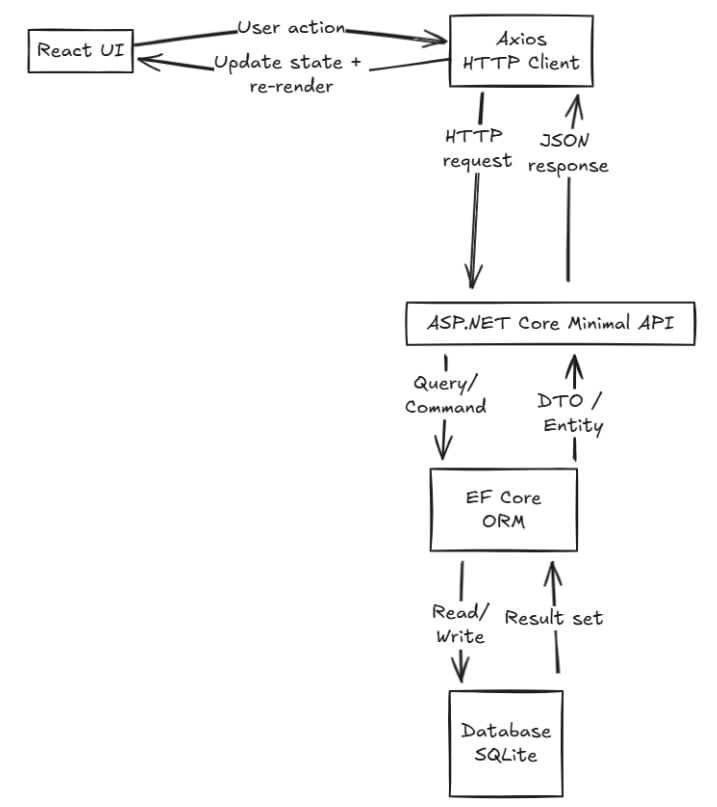
As mentioned above, we’ll use ASP.NET Core Web API (Minimal APIs), EF Core, and SQLite for the back-end. On the front-end, our app will be built with React and Vite. To handle the API request, we’ll use Axios, but you can achieve the same results using the Fetch API if desired.
Below is a schema of the architecture we’re going to follow in our example:
Why Minimal APIs Instead of Controllers?
Minimal APIs provide a modern way to build HTTP endpoints in ASP.NET Core with significantly less boilerplate than traditional controllers. Instead of using controllers and attributes, endpoints are defined directly in Program.cs (or grouped extensions), reducing boilerplate while keeping behavior explicit.
The Minimal APIs approach is especially well-suited for:
- CRUD services
- Microservices
- Lightweight APIs backing front-end apps
For a step-by-step .NET React CRUD tutorial, Minimal APIs keep the back-end easy to follow without sacrificing clarity.
Create the ASP.NET Core Back-End
Let’s begin by creating our API. The first step is to initialize a new .NET project by running the following command:
dotnet new webapi -n CrudApi
cd CrudApi
Now we can run it as follows:
dotnet runBy following those steps, you should see Swagger available by default. This gives us a quick way to test endpoints while we build the ASP.NET Core Web API example.
Add the Data Model and Database
To move forward with this example, it’s time to install the EF Core packages:
dotnet add package Microsoft.EntityFrameworkCore.Sqlite
dotnet add package Microsoft.EntityFrameworkCore.Design
Then, we build our Product’s model as shown below. This is intentionally simple but realistic for a C# .NET back-end tutorial.
Models/Product.cs
using System.ComponentModel.DataAnnotations;
namespace CrudApi.Models;
public class Product
{
public int Id { get; set; }
[Required]
[MaxLength(100)]
public string Name { get; set; } = string.Empty;
[Range(0, 1_000_000)]
public decimal Price { get; set; }
public bool IsActive { get; set; } = true;
}Once the model is ready, it’s time to create the DbContext:
Data/AppDbContext.cs
using Microsoft.EntityFrameworkCore;
using CrudApi.Models;
namespace CrudApi.Data;
public class AppDbContext : DbContext
{
public AppDbContext(DbContextOptions<AppDbContext> options) : base(options) { }
public DbSet<Product> Products => Set<Product>();
}Configure Minimal APIs
To configure the basics for our API, open Program.cs and replace the default content with the following:
using CrudApi.Data;
using CrudApi.Models;
using Microsoft.EntityFrameworkCore;
var builder = WebApplication.CreateBuilder(args);
builder.Services.AddDbContext<AppDbContext>(options =>
options.UseSqlite(builder.Configuration.GetConnectionString("DefaultConnection")));
builder.Services.AddEndpointsApiExplorer();
builder.Services.AddSwaggerGen();
builder.Services.AddCors(options =>
{
options.AddPolicy("frontend", policy =>
policy.WithOrigins("http://localhost:5173")
.AllowAnyHeader()
.AllowAnyMethod());
});
var app = builder.Build();
if (app.Environment.IsDevelopment())
{
app.UseSwagger();
app.UseSwaggerUI();
}
app.UseCors("frontend");
// Each MapGet, MapPost, or MapDelete call defines an HTTP endpoint directly, mapping a route to a
// handler function without requiring a controller class.
app.MapGet("/api/v1/products", async (AppDbContext db) =>
await db.Products.AsNoTracking().OrderBy(p => p.Id).ToListAsync()
);
app.MapGet("/api/v1/products/{id:int}", async (int id, AppDbContext db) =>
{
var product = await db.Products.FindAsync(id);
return product is null ? Results.NotFound() : Results.Ok(product);
});
app.MapPost("/api/v1/products", async (Product input, AppDbContext db) =>
{
db.Products.Add(input);
await db.SaveChangesAsync();
return Results.Created($"/api/v1/products/{input.Id}", input);
});
app.MapPut("/api/v1/products/{id:int}", async (int id, Product input, AppDbContext db) =>
{
if (id != input.Id) return Results.BadRequest();
var exists = await db.Products.AnyAsync(p => p.Id == id);
if (!exists) return Results.NotFound();
db.Entry(input).State = EntityState.Modified;
await db.SaveChangesAsync();
return Results.NoContent();
});
app.MapDelete("/api/v1/products/{id:int}", async (int id, AppDbContext db) =>
{
var product = await db.Products.FindAsync(id);
if (product is null) return Results.NotFound();
db.Products.Remove(product);
await db.SaveChangesAsync();
return Results.NoContent();
});
app.Run();Then, add the connection string:
appsettings.json
{
"ConnectionStrings": {
"DefaultConnection": "Data Source=crud.db"
}
}
Note: In production systems, many teams prefer using DTOs and explicitly mapping only the fields they allow updating. This avoids accidental overwrites and gives more control over data changes.
Create the Database
Run the following command to complete the setup for the database:
dotnet ef migrations add InitialCreate
dotnet ef database updateAt this point, the back-end supports a full Create, Read, Update, Delete app in .NET and React operations using Minimal APIs.
Create the React Front-End
Now that our back-end is ready, let’s move on to the front-end. As mentioned above, we’re going to use React and Vite to build the UI, so the first step is to create the React app:
npm create vite@latest crud-ui -- --template react
cd crud-ui
npm install
npm run dev
This initializes the front-end portion of the React front-end .NET back-end tutorial.
To handle the API request, we’re going to use Axios, so we have to install the package as well:
npm install axiosAPI Integration React and .NET
To build a React Axios CRUD example, we’ll start by creating a small API client supporting all the operations, so we can reuse it across the different parts of our app:
src/api/productsApi.js
import axios from "axios";
const api = axios.create({
baseURL: "https://localhost:5001/api/v1", // adjust port if needed
});
export async function getProducts() {
const res = await api.get("/products");
return res.data;
}
export async function createProduct(payload) {
const res = await api.post("/products", payload);
return res.data;
}
export async function updateProduct(id, payload) {
await api.put(`/products/${id}`, payload);
}
export async function deleteProduct(id) {
await api.delete(`/products/${id}`);
}Tip: check the API’s launch URL in the console output (or Properties/launchSettings.json) and match it in Axios.
Build the React CRUD UI
Time to focus on the components. To keep React state management for CRUD simple and predictable, we’re going to have one single component inside App.jsx with a combination of useEffect for the initial data fetching, and different useState to store the products and the user’s inputs. This approach works well for small-to-medium CRUD flows and keeps the learning curve low.
For more complex examples or implementations, you may consider some strategies to improve code readability and maintainability, such as code splitting, custom hooks, and a global state management system to share state across different components (e.g., Context API, Redux, etc).
src/App.jsx
import { useEffect, useState } from "react";
import {
getProducts,
createProduct,
deleteProduct
} from "./api/productsApi";
export default function App() {
const [products, setProducts] = useState([]);
const [name, setName] = useState("");
const [price, setPrice] = useState("");
useEffect(() => {
loadProducts();
}, []);
async function loadProducts() {
const data = await getProducts();
setProducts(data);
}
async function onCreate(e) {
e.preventDefault();
const payload = {
name,
price: Number(price),
isActive: true
};
const created = await createProduct(payload);
setProducts((prev) => [...prev, created]);
setName("");
setPrice("");
}
async function onDelete(id) {
await deleteProduct(id);
setProducts((prev) => prev.filter(p => p.id !== id));
}
return (
<div style={{ maxWidth: 720, margin: "40px auto", fontFamily: "system-ui" }}>
<h1>Products CRUD</h1>
<form onSubmit={onCreate} style={{ display: "flex", gap: 8, marginBottom: 20 }}>
<input
value={name}
onChange={(e) => setName(e.target.value)}
placeholder="Product name"
required
/>
<input
value={price}
onChange={(e) => setPrice(e.target.value)}
placeholder="Price"
required
/>
<button>Add</button>
</form>
<ul style={{ listStyle: "none", padding: 0 }}>
{products.map(p => (
<li key={p.id} style={{ display: "flex", justifyContent: "space-between", marginBottom: 10 }}>
<span>
<strong>{p.name}</strong> - ${p.price}
</span>
<button onClick={() => onDelete(p.id)}>Delete</button>
</li>
))}
</ul>
</div>
);
}To provide a smoother user experience, you would typically apply some common UI strategies, such as adding loading states, basic error handling, and optimistic UI updates in production apps.
How This Scales in Real Projects
Even though this is a step-by-step full-stack .NET React CRUD tutorial, it can be easily scaled by implementing some improvements both in the API and the front-end:
- Maintain a clean project architecture and split large pieces of code into separate files to improve maintainability.
- Minimal APIs can be grouped with MapGroup.
- DTOs can replace EF entities.
- Validation can be added via filters or libraries.
- An authentication system can be layered in cleanly.
- Global state management systems (Context API or Redux, etc) improve the way of sharing information between components, avoiding the pitfalls of using prop drilling.
- Front-end libraries that can handle data fetching with cache (such as RTK Query, React Query, among others) are a good alternative to reduce API calls, especially if different parts of your application consume the same back-end services.
Deploy .NET and React App (Overview)
Deployment strategies often include having the React build in a static hosting (AWS S3 bucket, Azure Static Web Apps, among others); on the other hand, the back-end may be deployed in an App Service, container, or VM. For example, you could deploy your React app to Azure Static Web Apps and host the ASP.NET Core API in Azure App Service.
Regardless of the specific tools selected for each use case, you have to keep in mind that maintaining a strong separation of concerns is crucial for ensuring a clean API integration between React and .NET across all environments.
Finally, remember to use environment variables both in the back-end and the front-end to store sensitive information, such as API Keys and database credentials; it will help you to prevent security leaks.
Common Issues and Fixes
While learning how to build a CRUD app with .NET and React, you may encounter some classic issues. By addressing them early, you can avoid unnecessary debugging and speed up development, especially when integrating front-end and back-end for the first time.
CORS
A typical error you may observe in the console when trying to reach the API for the first time is the request being blocked due to CORS policies. To address this issue, check the Program.cs file to ensure a proper policy is in place, and validate that the front-end origin is whitelisted.
HTTPS mismatch
Whereas in cloud environments your app will use the HTTPS protocol, for local development, a single HTTP protocol is enough. However, in this case, you need to ensure both sides of your app (back-end and front-end) are using the same protocol; otherwise, your request will fail. If you face some error while trying to reach your local-hosted API, remember to check your request to ensure there is no mismatch between what the server exposes and what the UI is actually calling.
Incorrect port configuration
Sometimes you define a port in the API, and then you use a different one to do the API request from the front-end. Double-check the Axios client configuration to ensure everything is correct.
When to Use Controllers Instead
Minimal APIs are ideal for CRUD services, but controllers still make sense when your APIs grow very large, or in case you rely heavily on filters and attributes. Moreover, if you’re working on a team that prefers a strict MVC structure, using the controller-based approach would fit more naturally into your development system.
Nevertheless, for most CRUD-style services backing a React app, Minimal APIs are a strong default.
Conclusion
This guide showed how to implement a full-stack web development .NET React using modern ASP.NET Core Minimal APIs. By following the steps above, you can achieve a clean, readable back-end paired with a simple React front-end + exactly what most real-world applications need. Of course, this example can be expanded with authentication, pagination, search, or deployment pipelines.
When organizations move from prototypes to production-ready systems, engaging teams that provide custom React development services is beneficial. These services help solidify the foundation and ensure it can scale securely as project needs increase.