

Creating an AI-Powered API Documentation Generator with Node.js
What Is an API Documentation Generator and Why Does It Matter
In the process of software development, it is a very important task to document the source code, the front/back-end contracts, and the overall design of how everything works. It is a part of development that helps your project’s maintainability, allowing future developers to understand what’s happening and how its modules behave while guaranteeing API contracts will always work. In this process, API documentation generators such as Swagger or JSDoc are typically used, as they enable documentation to be created within the main code and generate an easy-to-read HTML page.
Due to the vital importance of well-written and well-maintained documentation, if it is not well-written or isn’t up to date, your system’s maintainability and upgradability will be really harmed. Future developers who may be hired to keep improving the system you create will have a hard time understanding what is happening and why things are the way they are, and that will sooner or later lead to conflicts and bugs. The maintenance cost increases, inconsistencies appear everywhere, and then the back-end and front-end cannot communicate as they should.
To address this, using AI-based software for documentation is already a popular and functional alternative, ensuring that your documents are always well-written and up-to-date. It can go as far as to integrate within your CI/CD pipeline, automatically parsing new features and updating your documentation, or even using it as a guide to judge whether or not new features adhere to the project’s patterns. Therefore, it is a crucial feature to incorporate into your custom Node.js development services, and one that will become increasingly important over time, as AI agents replace traditional programmers in creating new software.
Architecture of an AI-Powered API Documentation Generator
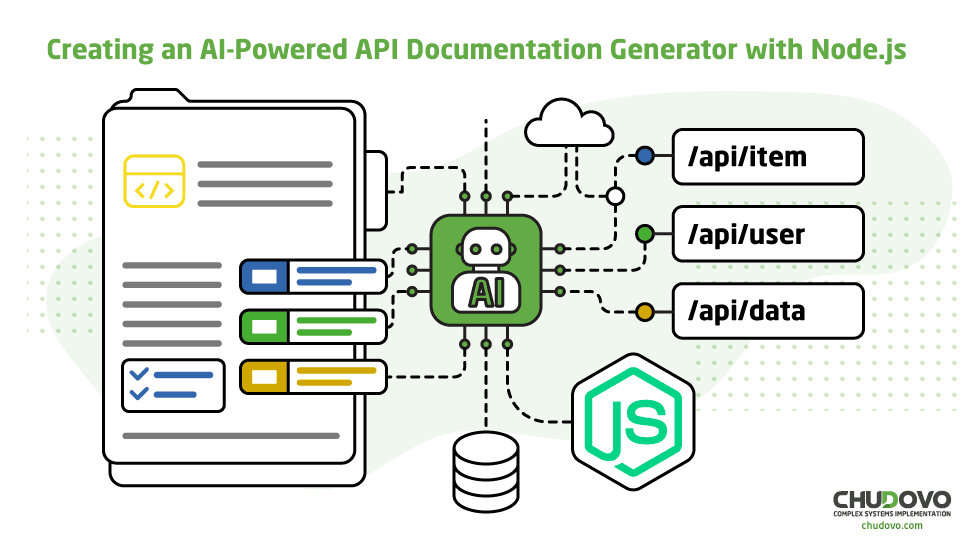
The architecture of an AI-powered API documentation generator is based on using deterministic pipelines that extract technical information from the source code, using semantic inference with AI. The primary goal is to transform the backend code into consistent, up-to-date, and readable documentation that will serve as a comprehensive guide for the entire project. Here’s a bit more about it:
Core Components of the System
It revolves around four main components, each with well-defined responsibilities, and they all cooperate to make the pipeline work. They consist of the following steps:
- Code parser: In this step, the entire codebase is processed and converted into an Abstract Syntax Tree (AST), which is a structured and hierarchical representation of the code, transforming it into semantic nodes. To achieve this, tools such as @babel/parser, esprima, and acorn are utilized, and this is crucial for the rest of the pipelines, as it removes code ambiguity.
- Prompt builder: The prompt builder acts as a translation layer between AST code and what AI expects. It transforms structured data into clear prompts, deterministic, and with context in mind. It summarizes the intent of the endpoint, lists parameters, and indicates business rules, etc. A good prompt builder is essential to avoid generic descriptions and guarantee that the technical documentation is precise, most of all by generating request/response examples.
- AI inference layer: It is responsible for interacting with the language model (for instance, with the OpenAI API). It receives structured prompts and returns semantically enriched documentation. It explains the purpose of the endpoint, organizes technical information in a readable way, generates consistent examples, and standardizes the structure.
- Documentation renderer (Markdown / OpenAPI): The documentation renderer converts the AI output into readable formats, such as Markdown, OpenAPI, Swagger, or even static HTML, finishing the pipeline.
Why Node.js Is a Strong Choice for This Use Case
It is probably the best option to create your API documentation generator with Node.js, due to technical, clear, and objective reasons, which we will discuss a bit here:
- AST manipulation in JavaScript: Since the codebase is often written in JavaScript or TypeScript, Node.js enables direct code analysis, the use of native parsing libraries, and fewer semantic losses during extraction. This reduces complexity and makes the process more secure, stopping errors from happening from the beginning.
- Natural integration with JS back-end projects: A documentation generator in NodeJS can be integrated into the development process in many different ways. They list options such as configuring it as an internal script, integrating it into the CI/CD pipeline, executing it alongside the integrated tests, or using it via a CLI, for instance. With this, the adoption of the documentation generator becomes much easier, straightforward, and natural.
- Mature ecosystem: NodeJS ecosystem offers mature libraries for parsing and linting, toolings for automation and build, easy integration with AI APIs, and is widely popular among developers. As a result, Node.js becomes a natural choice for solutions on automated API documentation and backend documentation automation, most of all in JavaScript environments.
Implementing a Node.js API Documentation Tool (Code Example)
Basic Project Structure
The following project structure clearly sets apart technical responsibilities, which is essential for future maintenance and scalability. It is clear and easy to understand, making a future-proof structure, so it is a good example to be followed at the beginning of a project:
project-root/
├── src/
│ ├── api/
│ │ └── users.routes.js
│ └── docs/
│ ├── parser/
│ │ └── routeParser.js
│ ├── ai/
│ │ └── openaiClient.js
│ ├── generator/
│ │ └── generateDocs.js
│ └── output/
│ └── users.md
├── scripts/
│ └── generate-api-docs.js
├── package.json
└── .env
Example: Generating Documentation for an Express Endpoint
Now, for the project example, we will have it divided into different steps and explain it one at a time.
- Endpoint code
// src/api/users.routes.js

import express from 'express';

const router = express.Router();

router.get('/users', async (req, res) => {

 res.json({

   success: true,

   data: [{ id: 1, name: 'John Doe' }]

 });

});

export default router;
That’s a very basic endpoint made with Express. It exposes a GET /users route that returns mocked user data.
- Parser code
// src/docs/parser/routeParser.js

import fs from 'fs';

import { parse } from '@babel/parser';

import traverse from '@babel/traverse';

export function parseRoutes(filePath) {

 const code = fs.readFileSync(filePath, 'utf-8');

 const ast = parse(code, {

   sourceType: 'module',

   plugins: ['jsx']

 });

 const routes = [];

 traverse(ast, {

   CallExpression(path) {

     const callee = path.node.callee;

     if (

       callee.type === 'MemberExpression' &&

       ['get', 'post', 'put', 'delete'].includes(callee.property.name)

     ) {

       const httpMethod = callee.property.name.toUpperCase();

       const routePath = path.node.arguments[0]?.value;

       routes.push({

         method: httpMethod,

         path: routePath

       });

     }

   }

 });

 return routes;

}
That’s the parser that interprets the structure of the system itself, understanding its routes and methods and generating the AST. It serves as the base for a JavaScript API documentation generator.
- AI request
// src/docs/ai/openaiClient.js

import OpenAI from 'openai';

const client = new OpenAI({

 apiKey: process.env.OPENAI_API_KEY

});

export async function generateDoc(route) {

 const prompt = `Generate API documentation in Markdown for the following endpoint:

Method: ${route.method}

Path: ${route.path}

Include:

- Description

- Request example

- Response example`;

 const response = await client.chat.completions.create({

   model: 'gpt-4.1-mini',

   messages: [{ role: 'user', content: prompt }],

   temperature: 0.2

 });

 return response.choices[0].message.content;

}
That’s the step that specifically requests OpenAI to understand a route from the backend and generate documentation for it. The function then returns the processed content to the caller, and that will be used in the next step.
- Generator orchestrator
// src/docs/generator/generateDocs.js

import fs from 'fs';

import { parseRoutes } from '../parser/routeParser.js';

import { generateDoc } from '../ai/openaiClient.js';

export async function generateDocumentation() {

 const routes = parseRoutes('./src/api/users.routes.js');

 for (const route of routes) {

   const markdown = await generateDoc(route);

   fs.writeFileSync(

     `./src/docs/output${route.path}.md`,

     markdown

   );

 }

}
That’s the actual orchestrator that runs a script to combine everything into a functioning Node.js API documentation tool. It understands the routes by calling the parser we’ve created previously, then iterates over them, calling the AI API and writing the final documentation with the fs native library. With it, the generator is finally working, and now we must transform it into a script to be configured in package.json.
- Executable script via package.json
// scripts/generate-api-docs.js

import { generateDocumentation } from '../src/docs/generator/generateDocs.js';

generateDocumentation()

 .then(() => {

   console.log('API documentation generated successfully.');

 })

 .catch(console.error);
Package.json:
// package.json

{

   "scripts": {

     "generate:api-docs": "node scripts/generate-api-docs.js"

   }

 }
And finally, to run the script, simply type npm run generate:api-docs on your terminal, and it will process your routes and generate the documentation at the end.
Common Use Cases for AI-Based Software Documentation
Though having a REST API documentation automation is useful and will bring improvements for nearly every type of project, some benefit the most. They list, most of all, in the number of those who are constantly changing and who are used by several different people, not only by internal users, such as is the case with libraries, SDKs, integrations, etc. Explaining it a bit more:
- Libraries and SDKs: First and foremost, libraries and SDKs that external developers also use obviously benefit the most from the implementation of API documentation with AI. It will guarantee that they get the most up-to-date and recent information possible, helping them develop what they have to and making their experience way more pleasant. In many ways, having well-written documentation can be the key to a library’s success, as it often happens that the documentation is outdated and the developer must debug to understand why their code doesn’t work.
- SaaS platforms, especially the smaller ones that lack a large support/CS/CX team, require structured documentation to help their user base understand what’s new in their app and how to use it effectively. Also, sometimes, SaaS solutions can be so innovative that its user base needs to be educated on what it does and how it does it; hence, the necessity of updated documentation to serve as a guide.
- B2B integrations: When you’re a provider for a B2B integration, it is crucial to properly write down how to integrate, providing examples and expected requests/responses. These critical services can shut down businesses if they fail or if the documentation is outdated, and a developer codes a system based on old endpoints and models. So, it is obvious that, in this case, each new modification to the API must be documented and well-explained to help your user base adapt and improve their products as well.
There are many other perfect use cases for a system to generate API documentation using artificial intelligence, and, to some extent, every type of project can take great benefit from it. The basic parser we have previously provided can easily be extended and improved, and also adapted to work with frameworks such as NestJS, cooperating with other documentation tools like Swagger and OpenAPI Generator.
Conclusion: Building a Practical AI-Powered API Documentation Generator
Given all of this, we can conclude how important it is to use generative AI for API documentation, creating a pipeline that automatically understands what you’ve added to the project and keeps your docs updated. It is, most of all, important in case your company especially depends on the docs for its user base to be able to use the product, as is the case when you publish libraries and SDKs, B2B integrations, etc.
At last, if you have any type of backend API project with NodeJS, using an automated AI documentation generator can save you and your developers a lot of time that would otherwise be dedicated to writing the docs. Finally, by abstracting this task, you don’t depend on the developer being able to properly express what the endpoint does: the AI surely will explain it better.