

How to Architect a Scalable VR Training Simulator for Enterprise Learning
VR training pilots fail in predictable ways. A team prototypes a fire safety scenario in Unity, demos it on a Quest 3, and then runs into a wall when the LMS team asks what data format the headset outputs. Six weeks later, there is a working scenario and a broken LMS integration. The architecture decisions that would have prevented this were never made because the project started with the demo, not the data pipeline.
This article explains how to architect a VR training simulator that remains maintainable as content libraries, backend integrations, and learner counts grow. The focus is enterprise VR training: backend integration, LMS connectivity, scalable Unity project structure, and VR application architecture for long-term maintainability.
Choosing the Right Engine for VR Training Software Development
Every virtual reality training software project starts with the same constraint: choose an engine and a headset combination before any other decision. These early choices shape the entire Unity VR development process, and changing either mid-project is expensive enough to be essentially off the table.
At the enterprise level, Unity is the default for VR training simulator development. Some of the reasons are:
- Road support for standalone headsets
- A mature OpenXR implementation
- A larger C# developer pool than Unreal
When photorealism is non-negotiable, Unreal is a reasonable choice. But staffing it over a multi-year maintenance horizon is harder, and that cost matters when the organization plans to add scenarios over time.
If you’re looking at standalone headsets for work, the Meta Quest 3 is pretty much the go-to right now. You don’t need a PC; setup is easy with Meta for Work, and the graphics easily hit a smooth 72Hz if your project is well-optimized.
The Universal Render Pipeline is the right call for standalone headsets within the Unity rendering side. It has been designed for mobile GPUs and supports fixed foveated rendering. Thanks to this, it renders the peripheral field at a lower resolution to reduce GPU load. On its side, the High Definition Render Pipeline delivers higher visual fidelity but is designed primarily for high-end desktop GPUs. Its rendering architecture and feature set are not well-suited to the mobile tile-based GPU architecture used by standalone Quest headsets, making URP the practical choice for enterprise VR deployments. You have to make this choice at the time of the project’s setup because switching rendering pipelines mid-project is not a quick task.
Unity Project Architecture: Building Scalable VR Software Architecture
When dealing with a monolithic Unity project in an enterprise training context, the main issue does not arise when it stops working. It comes each time the content needs to be updated. In a well-designed system, fixing a step description in a safety scenario should not require touching scene files and risking regressions in adjacent modules.
This modularity is the basis of the enterprise VR training software architecture, allowing to evolve scenarios, integrations, and analytics without restructuring the entire project.
The pattern that holds up at scale is a module-per-scenario structure with a shared runtime core:
Assets/
_Core/
   XRRig/
   ScenarioManager/
   AnalyticsClient/
   UIFramework/
Modules/
   FireSafety/
     Scenes/
     Prefabs/
     ScriptableObjects/
   EquipmentInspection/
StreamingAssets/
   Configs/
ScriptableObjects are the right data container for scenario configuration. Step sequences, pass/fail criteria, timeout durations, and localization strings all belong there. The scenario state machine reads from ScriptableObjects at runtime. Changing a step description means editing a data asset, not C# logic. That distinction matters when content updates need to go through a subject matter expert review rather than a full engineering sprint.
The default configuration bundled with the app is stored under StreamingAssets/Configs/, and any downloaded configuration updates should be stored under Application.persistentDataPath. When the app is started, the ScenarioManager can load the local overrides first and then fall back to the bundled configuration if there is no updated version available. This allows the backend to send revised step descriptions or threshold values without needing to do a full APK release. For enterprises that update their compliance training on a quarterly basis, configuration level updates can be sent out far more quickly than deploying a new application build to an MDM-managed headset fleet.
The ScenarioManager controls the session lifecycle and dispatches xAPI statements only after a scenario completes, avoiding partial records in the LRS.
Backend Services: What Actually Needs to Be Server-Side
Standalone headsets can run self-contained training scenarios without a backend. Production deployments typically require centralized configuration, multi-user coordination, xAPI buffering, analytics aggregation, and authentication services. A couple of endpoints built in a .NET or Node.js service are enough:
| Endpoint | Purpose |
| GET /scenarios/{id}/config | Returns current scenario config JSON |
| POST /sessions | Creates a session record, returns a session token |
| POST /sessions/{id}/statements | Buffers xAPI statements for LRS forwarding |
| GET /sessions/{id}/status | Used by instructor dashboards |
For cloud-native deployments, it is common to use a containerized .NET or Node.js API, a managed relational database, and object storage for configuration bundles.
xAPI statement delivery to the LRS should be asynchronous. The headset posts statements to a backend service that acts as both an authentication proxy and a buffering layer before forwarding them to the LRS on its own schedule. This approach keeps LRS credentials out of the application, centralizes authentication, and decouples session completion from LRS availability, which matters when enterprise platforms have maintenance windows or rate limits. A learner should not receive a failed session record because the LRS was unavailable during the training session.
LMS Integration: SCORM vs. xAPI
LMS integration is where most VR training software development projects underinvest. In most cases, the consequences are not evident during development; they surface during a procurement review or a compliance audit. Successful LMS integration with VR training software requires more than reporting scenario completion. Metrics such as time-to-decision, error rates, and checklist omissions depend on a well-designed xAPI schema defined before content production begins.
SCORM (1.2 or 2004) works with virtually every enterprise learning platform, although its reporting capabilities remain limited for immersive experiences. This is because it was designed for browser-based eLearning and captures completion, plus a score. Because of this, SCORM is often insufficient for a VR training simulator where the behavioral data is the point.
xAPI (Tin Can API) is statement-based: Actor, Verb, Object, with an extensions block for arbitrary data. A VR session can emit statements like:
{
"actor": { "account": { "name": "user123" } },
"verb": { "id": "http://adlnet.gov/expapi/verbs/completed" },
"object": { "id": "urn:scenario:forklift-inspection" },
"result": {
"score": { "scaled": 0.82 },
"extensions": {
"time_to_first_hazard_ms": 47200,
"checklist_items_skipped": 1
}
}
}
Those statements flow to a Learning Record Store, not directly to the LMS. The LRS holds the raw xAPI records; the LMS receives summary data from the LRS or from the backend aggregator. cmi5 extends xAPI by standardizing how an LMS launches external learning applications, manages learner identity, and exchanges LRS connection details. It is a strong choice when LMS interoperability is a priority.
The capabilities of these connectors are different for each LMS platform. Be sure to check the xAPI and cmi5 support of each vendor before deciding on an integration approach.
The integration flow for standalone headsets:
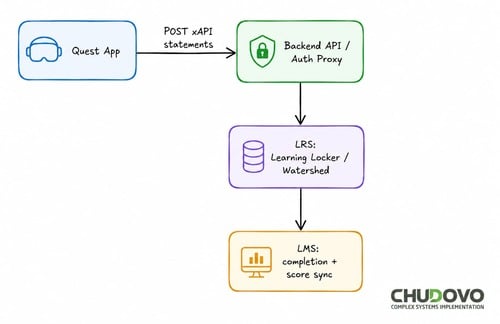
From the user’s point of view, it will look like the following:
- At the beginning, a launcher page bridges the LMS and the headset.
- As the learner opens the assignment in the LMS portal, a session token is created to launch the scenario assigned in the headset.
For smaller deployments, short codes may be used, while larger enterprise environments tend to use deep links, QR-code login, or SSO-integrated launch workflows. xAPI statements carry the same session context to associate results with the learner profile.
Multi-User Synchronization
While multi-user support might be unnecessary for many initial deployments, planning for it early avoids costly architectural changes later. The two common use cases are:
- Instructor-led sessions: where an instructor avatar can observe and intervene.
- Collaborative scenarios: where two or three learners share a virtual environment.
Both need synchronized headset positions, controller and hand poses, and interaction events.
Photon Fusion has improved client prediction for responsive XR interactions, whilst Mirror is an open-source alternative with self-managed networking. The optimal choice will depend on the complexity of the interaction, scalability, and deployment requirements.
Synchronize the minimum necessary: headset position and orientation, hand and controller poses, and discrete interaction events are enough. Scene state is authoritative on the host and replicated to clients. xAPI statements are generated locally on each client and dispatched independently. The more simulation logic that goes inside the network layer, the harder the system is to test in isolation.
Performance Optimization for Your VR Training Simulator
The following are general Meta Quest performance targets: 500-800 draw calls, GPU frame time under 4.5ms, CPU under 8ms. Shipped titles that perform well tend to land closer to 450-650 draw calls.
Below are the most common avoidable performance problems in VR training software development:
Uncompressed textures. ASTC texture compression is essential on Quest. Uncompressed textures significantly increase memory bandwidth and often cause hitching.
Mono scripting backend. Production Quest builds should use IL2CPP for better runtime performance and compatibility with modern Meta XR SDK releases.
OpenGL ES 3.1. Modern Quest development should target Vulkan. Recent Meta XR SDK versions have deprecated OpenGL ES support, so new Quest 3 projects should treat Vulkan as the standard graphics API rather than keeping legacy OpenGL ES configurations in the build.
One last thing to remember: you should always plan the level of detail before building environments. Retrofitting it later is expensive. Fixed foveated rendering is worth enabling. It renders peripheral regions at lower resolution with effects that are largely imperceptible in training content, where learner attention is typically centered on a task.
Let’s have a look at the code below:
#if UNITY_EDITOR
using UnityEngine;
using UnityEditor;

[ExecuteInEditMode]
public class DrawCallAudit : MonoBehaviour
{
    void OnGUI()
    {
        int batches = UnityStats.batches;
        GUI.color = batches > 800 ? Color.red : Color.white;
        GUI.Label(
            new Rect(10, 10, 220, 20),
            $"Editor batches: {batches} / ~650 target");
    }
}
#endif
Chudovo’s team uses this minimal editor-only during the scene-build stage to identify rendering budget overruns before they compound. This is helpful to get a rough estimate during development. Unity’s Rendering Debugger and Profiler remain the authoritative tools for performance analysis in URP-based projects.
Security Considerations for Enterprise Deployments
Enterprise IT teams will want to know about authentication, data residency, and device management. Planning for these early saves you from rework later.
Use short-lived JWTs for authentication instead of embedded ones. In an enterprise deployment, you usually integrate with Azure AD or Okta through SSO.
On the data side, it’s important to be aware that xAPI statements contain learner identity and performance data. They should be encrypted at rest in the LRS and any intermediate storage. GDPR and similar regulations apply in most jurisdictions.
Standalone headsets need to be enrolled in MDM for device management. This can be done with Jamf, Workspace One, or Meta’s MDM. MDM includes APK distribution, certificate management, and remote wipe. It also helps circumvent the manual process of updating a 50-headset fleet.
It is also worth mentioning that all backend communication should use TLS 1.3 whenever possible, keeping TLS 1.2 only where compatibility with existing enterprise infrastructure is required. For regulated industries, all the network traffic should remain confined to approved cloud regions or on-premises infrastructure in accordance with the applicable compliance framework.
Putting the Architecture Together
| Concern | Small Pilot (<50 learners) | Enterprise Scale (500+ learners) |
| Content delivery | APK sideloaded via MDM | CI/CD pipeline integrated with MDM for OTA deployment |
| LMS integration | SCORM 1.2 package | xAPI + LRS (Watershed or Learning Locker) |
| Backend | Minimal REST API | Async queue, managed failover |
| Multi-user | Not required | Photon Fusion or Mirror (self-hosted) |
| Analytics | LMS completion/score | xAPI extensions: time-on-step, error rate |
| MDM | Basic | Full fleet management with remote wipe |
A small pilot does not need the full stack. A SCORM package, a single-scenario APK, and a basic LMS are enough to validate the training model. The additional architecture is only warranted when scale demands it, and scaling into it is significantly easier when the module structure and xAPI schema were designed correctly from the start.
Conclusion
Architecting an enterprise VR training simulator is mostly a systems integration problem. Existing tooling offers good solutions for VR rendering and interaction work; the harder part is how to manage the data pipeline. Getting session data off a standalone headset, through a backend queue, into an LRS, and out as something an L&D team can actually act on, that’s the real challenge.
These architectural choices also reflect the best practices for VR training software development, reducing the cost of future content updates, LMS integrations, and fleet expansion. Custom VR training solutions that treat the data architecture as the primary design problem deliver more scalable immersive training solutions over a multi-year maintenance horizon.