

Zero-Downtime Database Migration for Legacy Systems: A Practical Developer’s Guide
Zero-downtime database migration is where good intentions meet production reality. After years of production changes, database migration challenges accumulate quickly.
Legacy systems add another layer:
- Years of undocumented changes
- Foreign key relationships that exist nowhere in the codebase
- Data volumes that make dev environment testing largely useless.
In almost all cases, there’s no maintenance window. The system needs to stay up.
Whether you’re involved in that situation (or you’re looking forward to avoiding being there), this guide is for you. Here, we’ll cover different techniques that hold up in real production database migration scenarios. Trade-offs are named explicitly, and the steps are specific enough to follow.
Why Downtime Matters More Than You Think
Every time you take a database offline, it has ripple effects in unexpected ways. You have dependent services that time out, background jobs that silently fail or queue up until the database comes back, and then flood it with retries.
Those effects may happen even if the shutdown is brief. But the consequences may depend on your architecture. Systems that live entirely in a monolith could survive a 30-minute migration window (perhaps). For distributed systems, the same 30 minutes can trigger cascading failures across services that were not involved in the migration. This is even more critical in regulated industries such as financial services or healthcare. In those cases, any unplanned downtime triggers incident reporting regardless of how visible the impact was to users.
In practice, zero downtime means the impact is small enough to be invisible to the system. It’s a target, not a hard guarantee.
The Core Challenge in Database Migration Without Downtime: Data Consistency During Migration
The main problem with a live database migration is that the application keeps reading and writing while the schema is changing. If you add a column and deploy at the same time, you’ll hit a gap. Old code writes rows without the new column, but the new code expects it. The database throws errors (or worse, silently writes nulls).
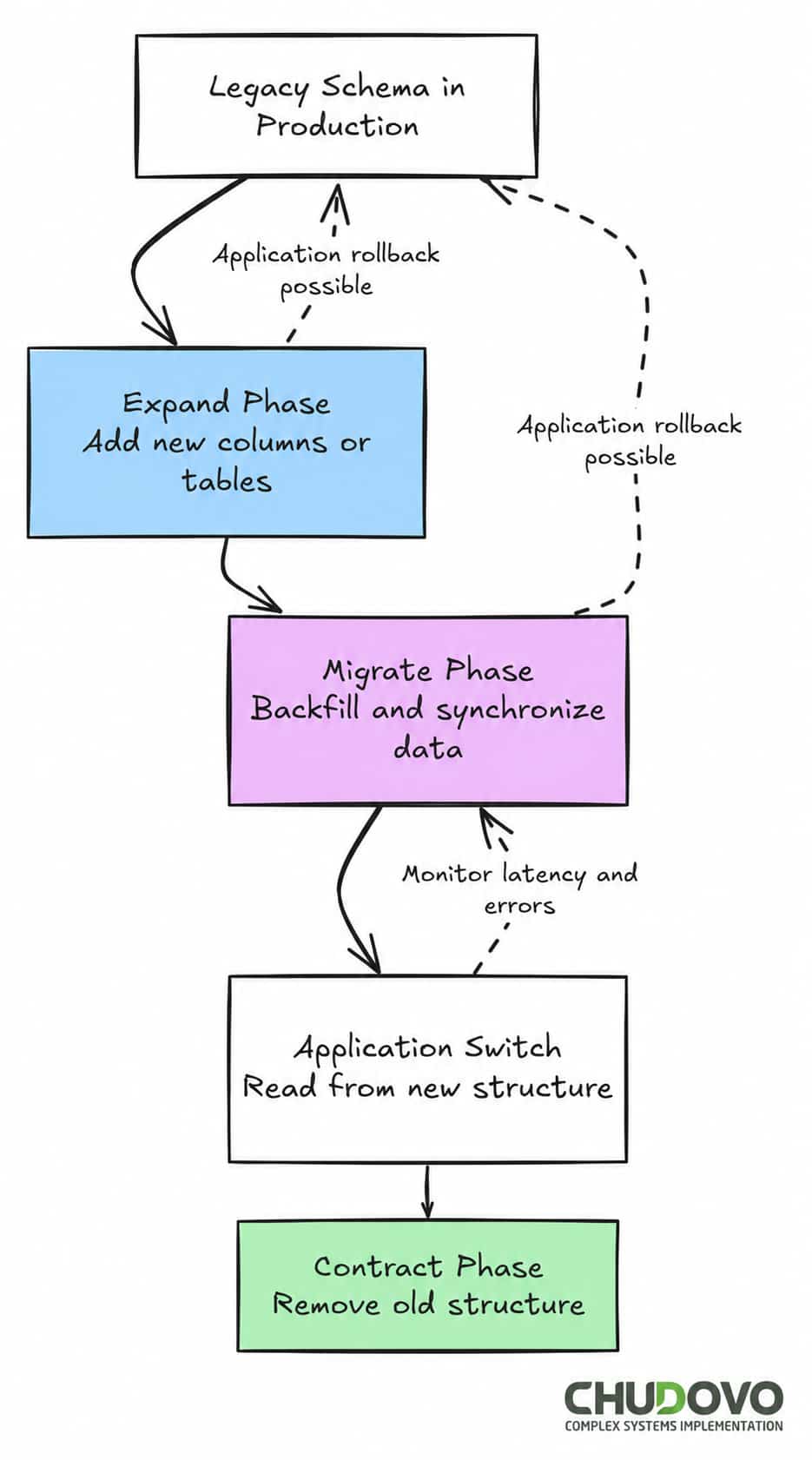
One way to address this directly is through the expand-contract pattern (also called parallel change). Most safe approaches to schema migration without downtime are variations of it.
It consists of three phases. It begins with the expand phase, where you add the new structure while leaving the old one intact. New columns or tables are created. The application is not using them yet. The second step is the migration phase, and here you move or transform the data in the background, while the application is still running against the old structure. Finally, in the contract phase, you remove the old structure after the data is fully migrated and the application has been updated. This ships as a separate release.
If something breaks during the expand or migrate phase, you roll back the application code. The schema doesn’t need to change.
Migration Patterns That Actually Work
Expand-Contract (Parallel Change)
As explained above, this is probably the most reliable pattern for zero-downtime database migration. In fact, most development teams rely on these zero-downtime schema migration techniques for their production systems. The dual-column period can stretch across several deployments. That’s expected, but it implies a cost, though: you have to keep running old and new structures simultaneously, sometimes for weeks. But that overhead is manageable. Unexpected outages are not.
Let’s take an example. You want to rename the user_name column to display_name. The first thing you do is to add display_name as a new column. At this point, the application code writes to both. Existing rows then get fully backfilled before reads switch to display_name. Finally, in a separate release, writes to user_name stop, and the old column gets dropped.
Blue-Green Deployment Database Strategy
Another common data migration strategy in legacy database migration projects is known as Blue-Green. In a few words, it keeps two environments running and switches traffic at the load balancer. For databases, the same idea applies: two instances, one active, one staged for the migration.
The hard part here is about synchronizing data between those two instances. Basically, you need writes flowing to both during the transition, or a short, controlled pause at the application layer. But, unlike a full outage, this pause is intentional (it takes seconds, not minutes) and recoverable.
Blue-green works well for major version upgrades or structural changes that resist incremental approaches. Rollback is straightforward: flip traffic back.
Canary Release for Database Changes
This approach basically means that a fraction of traffic (let’s say, 5%) goes to the new schema first. If error rates and latency stay flat, you expand the rollout. If something breaks, you pull back without affecting most users.
The practical requirement is dual-write. During the canary window, the application writes to both schemas. That logic lives in the application layer. It adds complexity but keeps data consistent across both schemas while the rollout proceeds.
AI-Assisted Modernization for Legacy Database Migration
The use of AI-assisted tools is starting to reduce some of the operational overhead involved in legacy database migration projects. With those tools, teams can accelerate repetitive analysis tasks that traditionally required manual review. That said, they do not replace migration planning or rollback strategies.
Let’s explore some of the most common use cases.
One of the initial steps in any migration process is dependency analysis. Before removing or touching any existing code, you need to understand what parts of your system will be affected by it. In older systems that lived for several years, there is a lot of application logic, stored procedures, and reporting jobs that often depend on undocumented schema relationships. A manual analysis of it could feel a little bit overwhelming.
An AI-assisted tool can help identify those relationships faster by analyzing:
- Query patterns
- ORM mappings
- Logs
- Historical database usage.
At the end, you get a summary of the dependencies involved and the changes you need to take into account.
Some teams also use AI-powered migration assistants to generate migration scripts, detect potentially blocking schema changes, or estimate the impact of long-running operations before execution. In large-scale modernization efforts where multiple services interact with the same production database, that is when those assistants are especially useful.
As you can see, AI tools help developers to automate analysis and tasks that otherwise would require manual effort and dedicated time. It means that teams can spend their time on the most important work: strategy and execution. AI-enabled workflows may improve the overall quality and reduce time to deliver, but the basics are still the same. Safe migrations in production still require additive schema changes, phased rollouts, production scale testing, and a validated rollback path.
Step-by-Step Execution: How to Migrate a Database Without Downtime
Here’s how Chudovo’s team structures a safe production database migration when they need to migrate a legacy database with a large table:
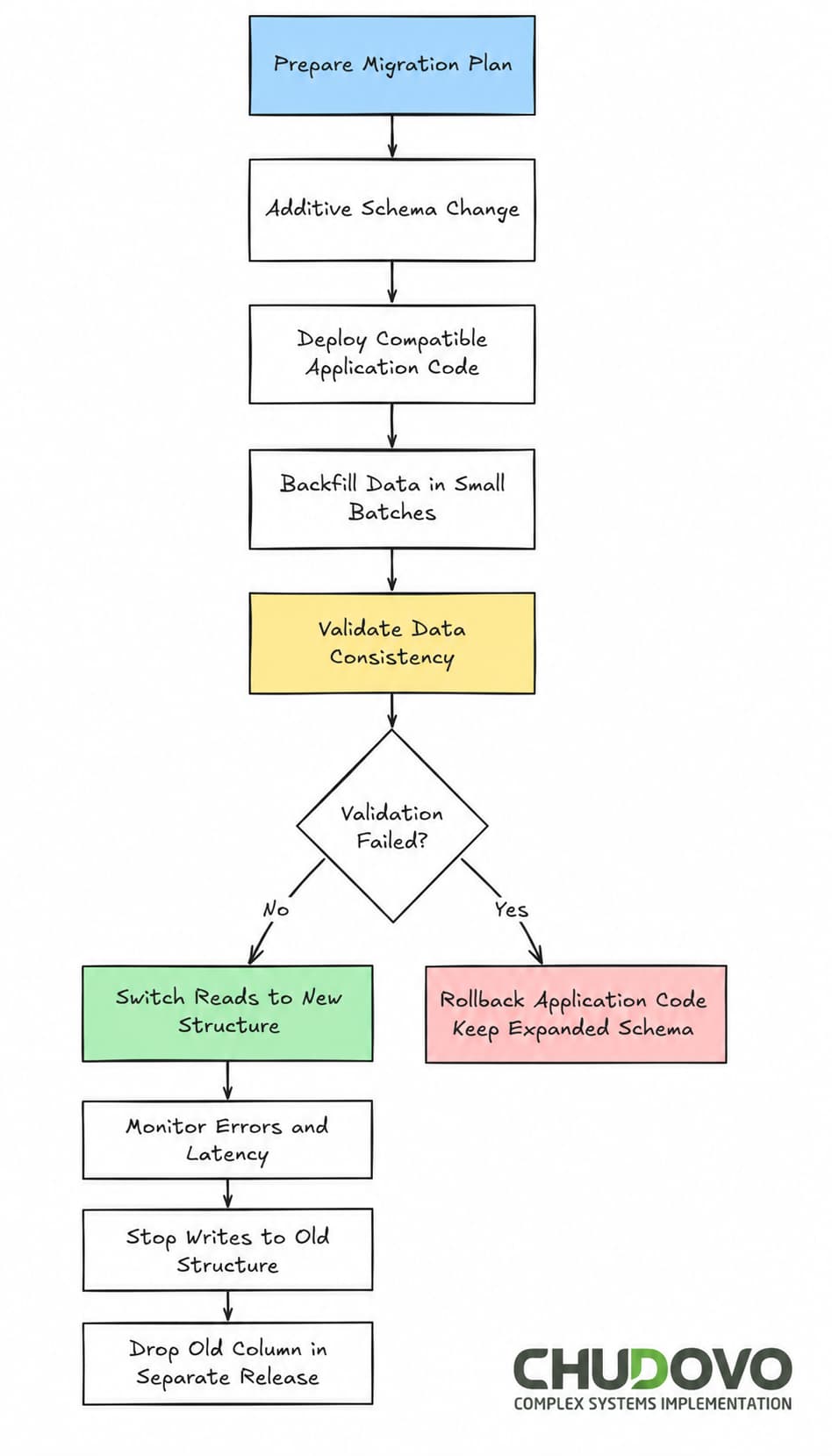
Batching the backfill is not optional on large tables. A single UPDATE across 50 million rows holds row locks long enough to cause visible latency spikes. Batches of 1,000–10,000 rows, with a brief sleep between runs, keep the migration below the noise floor.
Pattern Comparison
Below is a summary of the most common patterns that were presented in the previous sections:
| Pattern | Best For | Risk Level | Rollback Complexity |
| Expand-Contract | Column/table renames, additions | Low | Low |
| Blue-Green | Major version upgrades | Medium | Medium |
| Canary Release | Traffic-sensitive schema changes | Medium | High |
| Online DDL | Index creation, minor schema changes | Low-Medium | Low |
We’re introducing the last row. Online DDL capabilities were introduced in MySQL 5.6 (with major improvements in MySQL 5.7 and 8.0). PostgreSQL supports non-blocking operations such as CREATE INDEX CONCURRENTLY, but many ALTER TABLE operations still acquire exclusive locks. Additional tooling may be required for near-zero-downtime schema changes. These operations reduce or avoid long-running locks during schema changes. Not all DDL types qualify, and behavior varies by engine version.
Common Mistakes Worth Naming
Migrations as a deploy step
You may be tempted to include the migration job as a part of your release pipeline. For some cases, that could work, but in case the migration is slow, this will block the entire pipeline. A good approach is to perform schema migrations separately from application deployments.
No rollback plan
There is no guarantee that a migration will succeed. Actually, issues appear commonly. Some of them could be fixed, but in other cases, you need to roll back to the previous state. Every migration plan needs to have a defined path backward. For schema changes, keep old columns live through the transition. For data transformations, take a snapshot before you start. This will save you the pain in case things do not go as expected.
Wrong data scale in testing
Testing environments often fail to mirror the reality of production. A migration that takes 3 seconds on 100k rows can take 2 hours on the production copy. Underestimating the migration based on what you got from testing environments is a common pitfall. You should always test against volumes that reflect production, not dev.
Schema and data migrations in the same step
Both have different risk profiles. Mixing them makes each one harder to isolate and roll back. Doing both in separate phases will give you more control and reduce risks.
Rollback Strategy Database Planning for Migrations
We said it before. Migration plans do not always go as expected. This is why a rollback strategy is one of the best practices for legacy database migration. Its main purpose is to define how the system recovers when unexpected behavior appears in production.
We could consider the rollback from three points of view: application, data, and schema.
- Application rollback: This approach hinges on whether the previous application version can still run against the new schema. Thanks to the expand-contract, you can evolve the database with additive changes (e.g., adding nullable columns) and get backwards compatibility between versions of your app. Because both the old and new structures remain intact and synchronized through controlled dual-write logic, the system can be instantly reverted to the old code without data loss or downtime.
- Data rollback: This means the ability to recover from unexpected data corruption or loss suffered as a result of a transformation. Besides the usual Point-in-Time Recovery (PITR), a good approach is to use temporary “shadow” tables to hold original records before they’re transformed. Thanks to it, you can fix specific rows without the need to restore the entire database. For cloud snapshots, you may check that the Restore Time Objective (RTO) meets your downtime window, as restoring large data sets can take hours that your production environment might not have. Restore times should be measured and validated beforehand, especially for very large databases.
For very large tables, shadow-table approaches may require additional planning due to storage and locking considerations.
- Schema rollback: The main focus here is to reverse structural changes made to the database. Destructive actions (a table drop, renaming a column) are immediate and irreversible, so they must be postponed until the migration is fully verified. In addition, a “revert script” needs to be prepared and tested for every migration script, allowing you to undo DDL changes (like dropping newly created indexes or constraints) quickly. Always verify that your backup and restore process works on a staging environment first; a backup you haven’t tested is not a rollback plan.
Different approaches may be considered depending on your system’s needs, but the rule stays the same: test the rollback plan before the migration, not after something breaks.
Conclusion
Zero-downtime database migration for legacy systems is achievable, but the database migration challenges involved require discipline. Several patterns could be used to mitigate the risks. The expand-contract pattern handles most schema changes safely. Blue-green and canary approaches add more control for situations where incremental changes aren’t enough. There is one consistent thread across all of them: decouple schema changes from application deployments, test at production scale, and have a tested rollback path before anything runs as part of a safe database migration in production.
Any approach to database migration without downtime that skips those steps is slower to develop and faster to fail.