

Choosing Between Avalonia UI and .NET MAUI for Desktop Development
In recent years, web and mobile applications have received most of the attention thanks to the rise of powerful frameworks and libraries such as React. However, desktop apps aren’t going anywhere. With desktop apps, you can achieve several benefits: you get tighter OS integration, better control over performance, and (often) a simpler distribution story for enterprise users. This is the reason there are still a lot of products—internal tools, trading dashboards, IT utilities, engineering software, line-of-business apps—where desktop makes the most sense.
Inside the .NET ecosystem, there are two “famous” names that usually come up when teams start thinking about cross-platform desktop UI: Avalonia UI and .NET MAUI. While they overlap in the “write once, run on multiple OSes” pitch, they’re not aiming for the same thing. As you will discover later in this article, they represent two different philosophies in terms of development. For now, let’s say that one is more desktop-first, whereas the other is more multi-device-first.
This article focuses on the desktop angle: where each framework fits, what teams tend to like (or fight with), and how to make the choice without overthinking it. Follow along while we discover the key differences between these frameworks, as well as the use cases that could be a good fit for one or the other.
Where .NET Desktop Is Right Now
Microsoft keeps pushing the “one platform” story across web, mobile, cloud, and desktop. The release of .NET 10 is another step in that direction. At the same time, however, the classic desktop stack—WPF and WinForms—is still alive and widely used in production.
Given the existence of different options (each one with its own pros and cons), development teams often face a real challenge when deciding the tech stack that will be used for each new project. Actually, it is not enough just to ask yourself “Is .NET viable for desktop?”, you have to think about more practical questions, such as the following:
- Do we need Linux on the desktop platform, or just Windows/macOS?
- How much do we care about pixel-perfect consistency across platforms?
- Are we building a UI that’s mostly forms and navigation, or something heavy like grids, charts, and custom drawing?
- Do we want a “native look,” or do we want full control over styling?
- What’s our tolerance for platform-specific work when edge cases show up?
As you will discover in the upcoming sections, depending on your answers to those questions, your choice could be to use Avalonia UI or .NET MAUI.
What Is Avalonia UI?
Avalonia UI is an open-source UI framework that treats desktop apps as the main event. Windows, macOS, and Linux are all first-class targets. If Linux is on your list, Avalonia UI gets attention immediately for a simple reason: it’s one of the few serious options that doesn’t treat Linux like an afterthought.
Probably the major design choice you have to be aware of is that Avalonia UI renders its own controls instead of leaning on native widgets. This is not only a technical decision; it actually has a real impact on your projects.
The first of them is consistency, which means that by using Avalonia UI, you can achieve the same layout that tends to behave the same way across Windows/macOS/Linux. Therefore, you’re not constantly thinking “is this a platform quirk or my code?”, improving the development experience and ensuring maintainability and scalability.
On the other hand, having its own controls makes styling more flexible. This means that if your UI needs to match a brand system (or do something non-standard), Avalonia UI is usually more willing to cooperate. Moreover, you can push templates and styling pretty far without being forced into platform-specific hacks.
Here is an example that shows how to create a basic style for a button in Avalonia UI:
<Style Selector="Button.primary">
  <Setter Property="Background" Value="#4F46E5"/>
  <Setter Property="CornerRadius" Value="8"/>
</Style>
If your team has WPF experience, Avalonia’s use of XAML and common patterns (MVVM, binding, templating) usually makes it feel familiar. That familiarity is underrated when you’re trying to ship quickly.
There are some use cases in which Avalonia UI tends to shine. They include desktop-heavy apps with custom UI needs, internal tools that must run on mixed OS environments, and anything where “consistent behavior across OS” is a requirement rather than a nice-to-have.
What is .NET MAUI?
.NET MAUI (Multi-platform App UI) is Microsoft’s official framework that allows developers to build cross-platform applications. It has evolved from Xamarin. Forms and its primary focus is on mobile-first development, while it can also be used to develop desktop apps for Windows and macOS. Linux is not officially supported.
By using .NET MAUI, developers can write their code in C# and target all platforms (Windows, macOS, iOS, Android) with it. This helps to reduce the initial setup and improve development, avoiding repetitions and ensuring consistency. Although the code is the same, .NET MAUI will render platform-specific native controls (e.g., WinUI on Windows, UIKit on iOS), which provide a look, feel, and performance that is natural to each operating system.
For example, the following piece of code will create a button that defines its color based on the device’s mode (light or dark):
<Button
  Text="Save"
  BackgroundColor="{DynamicResource PrimaryColor}" />
.NET MAUI offers a deep integration with modern .NET features, tooling, and libraries, which allows developers to leverage the full power of the entire .NET ecosystem. Because .NET MAUI is backed by Microsoft, it integrates deeply with the Visual Studio toolchain, which includes advanced tooling and sophisticated debugging features that enhance productivity.
Because .NET MAUI allows developers to share and reuse a significant amount of the application’s business logic and user interface definitions (especially in C# and XAML) across both mobile (iOS, Android) and desktop (Windows, macOS) applications, companies often seek .NET MAUI app development services to maximize reuse and achieve cross-platform consistency.
Avalonia UI vs .NET MAUI: Platform Support
One of the most significant differences between Avalonia UI and .NET MAUI is the platform support. While Avalonia UI provides full support for Windows, macOS, and Linux, .NET MAUI does not provide official support for the last of them. If your team is involved in a development that targets Linux desktop environments or you’re building internal tools for diverse operating systems, then Avalonia UI should become your preferred choice. However, .NET MAUI remains a strong option if Linux desktop support is not a requirement for your project.
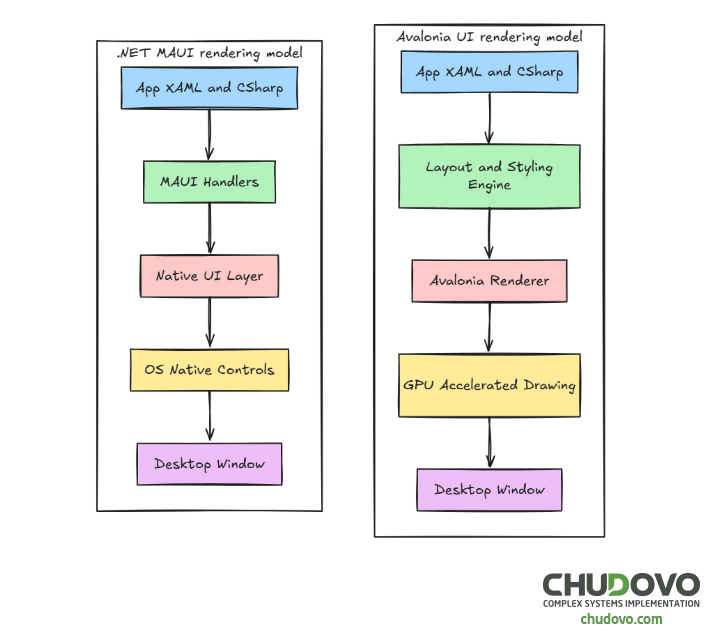
UI Architecture and Rendering Model
Avalonia UI
As previously mentioned, Avalonia renders its own UI controls. This approach provides a consistent look and feel across platforms while allowing deep customization through styles and templates. Having such flexibility often results in a predictable behavior regardless of OS differences.
Moreover, developers familiar with XAML in Avalonia UI and MVVM in Avalonia UI often find it similar to WPF, with modern enhancements.
.NET MAUI
Because .NET MAUI relies on the use of native controls with platform-specific behavior being handled automatically, the application feels more “native” to each OS. A frequently cited downside is that customizing the UI often necessitates platform-specific code, which increases complexity and maintenance difficulty.
Performance Considerations
While developing desktop applications, performance is a frequent concern. If you’re thinking about whether to choose between Avalonia UI and .NET MAUI, you should definitely take into consideration this topic in order to make the final decision.
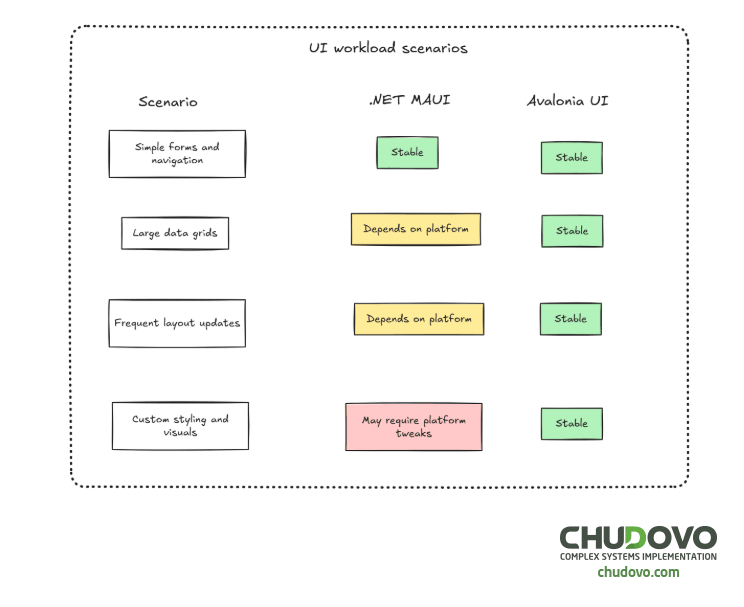
For .NET MAUI applications, it’s important to note that performance may vary depending on the platform on which the application is being used. This is mainly because the application depends on native control implementations, which can differ from one OS to another. That being said, desktop performance is generally solid, but mobile-first abstractions can add overhead.
On the other hand, Avalonia UI offers a consistent rendering pipeline and GPU-accelerated drawing, resulting in a predictable layout behavior and good performance for complex UIs. As a result, for desktop-heavy workloads, Avalonia UI is often perceived as more predictable, while .NET MAUI shines when sharing logic across platforms is more important than raw UI flexibility.
Below is a quick comparison of some of the most common workload scenarios and how each framework will perform on each of them.
Development Experience and Tooling. Learning curve
Each of Avalonia UI and .NET MAUI is backed by its own community and sponsors, who have a large influence on the way each framework sets up the development environment. This includes not only the Integrated Development Environments (IDEs) you will use but also the available tooling that comes with it, including extensions and debugging features. Therefore, by choosing one or the other framework, you’re also making a decision about how your developer experience would be.
As Avalonia UI is an open-source, community-driven framework, it can run and play nicely with all kinds of IDEs, not only the ones owned by Microsoft. In addition, Avalonia’s community is pretty active and widely open to provide support, cool add-ons, and code snippets that you can reuse within your project. All of this makes it feel more open and adaptable, significantly improving the overall user experience.
Another guiding idea behind Avalonia UI is flexibility. It means you don’t have to tie your project to a specific folder structure or the use of specific tools, which gives developers more freedom in organizing their solution (this can sometimes require more initial manual configuration, though). For example, you may require specific community tools or setup to enable features like Hot Reload.
On the other hand, we have .NET MAUI. Because it’s Microsoft’s official cross-platform framework, it benefits significantly from deep integration with the Visual Studio toolchain, which also offers a set of comprehensive features optimized for the framework. This also comes with consistent updates and long-term stability, all of which is backed by one of the most important companies within the IT industry.
With .NET MAUI, developers can have a single project file that contains the code for all target platforms, which helps to have a maintainable codebase, improves bug fixing, as well as the development of future features. This is also possible thanks to a wide set of built-in features and advanced tools such as XAML Hot Reload, .NET Hot Reload, and Live XAML Preview.
Teams with previous experience with WPF, Silverlight, or a desktop-focused XAML framework may experience a smooth transition to Avalonia UI. On the other hand, developers who are used to working with Xamarin.Forms or modern Microsoft tooling may experience a fluid transition to .NET MAUI, while understanding how the native UI control works could add some complexity, though.
In the end, both frameworks offer different experiences to developers. If your team feels comfortable having a tightly integrated, Microsoft-centric toolchain with strong built-in tooling, then using .NET MAUI is the way to go; if flexibility is what matters, Avalonia UI will be the best fit.
Avalonia UI vs .NET MAUI: A Summary
| Aspect | Avalonia UI | .NET MAUI |
| Desktop focus | Strong | Moderate |
| Linux support | Yes | No |
| UI rendering | Custom | Native |
| Customization | High | Medium |
| Mobile support | No | Yes |
| Available Tooling | Flexible | Visual Studio-centric |
Team Skills and Hiring Considerations
Choosing a framework may also affect the team composition and hiring strategy of your company.
If you choose Avalonia UI for your projects, you can benefit from developers who have previous experience in XAML and MVVM patterns. On the other hand, Xamarin or mobile-focused .NET developers could have a better alignment with the use of .NET MAUI.
The choice of framework may have an impact on whether to engage with engineers having cross-platform mobile experience or hire .NET desktop developers with desktop-first expertise for businesses that prioritize developing or scaling desktop products.
Practical code examples: the same ideas in Avalonia UI and .NET MAUI
A quick way to understand the difference between Avalonia UI and .NET MAUI is to implement the same small features in both: a tiny MVVM counter (binding + command) and a simple “native integration” action. Neither example is meant to be production-complete—the point is to show what the frameworks feel like when you start wiring UI to behavior.
Example 1: MVVM counter with binding (Avalonia UI)
Avalonia’s MVVM story will feel familiar if you’ve done WPF: bind a ViewModel to XAML and keep UI logic out of the view.
<!-- MainWindow.axaml -->
<Window xmlns="https://github.com/avaloniaui"
      xmlns:x="http://schemas.microsoft.com/winfx/2006/xaml"
      x:Class="Demo.MainWindow"
      Width="380" Height="200">
<StackPanel Margin="16" Spacing="10">
  <TextBlock FontSize="18" Text="{Binding CountText}" />
  <Button Content="Increment" Command="{Binding IncrementCommand}" />
</StackPanel>
</Window>
// MainWindowViewModel.cs
using System;
using System.ComponentModel;
using System.Runtime.CompilerServices;
using System.Windows.Input;
public class MainWindowViewModel : INotifyPropertyChanged
{
private int _count;
public string CountText => $"Count: {_count}";
public ICommand IncrementCommand { get; }
public MainWindowViewModel()
{
IncrementCommand = new RelayCommand(() =>
{
_count++;
OnPropertyChanged(nameof(CountText));
});
}
public event PropertyChangedEventHandler? PropertyChanged;
private void OnPropertyChanged([CallerMemberName] string? name = null) =>
PropertyChanged?.Invoke(this, new PropertyChangedEventArgs(name));
}
public sealed class RelayCommand : ICommand
{
private readonly Action _execute;
public RelayCommand(Action execute) => _execute = execute;
public event EventHandler? CanExecuteChanged;
public bool CanExecute(object? parameter) => true;
public void Execute(object? parameter) => _execute();
}The setup is explicit and predictable: you own the binding, property change notifications, and command wiring.
Example 2: MVVM counter with binding (.NET MAUI)
In MAUI, the pattern is similar, but it’s typically framed around Pages and a single project targeting multiple platforms. Many teams use Command and INotifyPropertyChanged in the same way.
<!-- MainPage.xaml -->
<ContentPage xmlns="http://schemas.microsoft.com/dotnet/2021/maui"
            x:Class="Demo.MainPage">
<VerticalStackLayout Padding="16" Spacing="10">
  <Label FontSize="18" Text="{Binding CountText}" />
  <Button Text="Increment" Command="{Binding IncrementCommand}" />
</VerticalStackLayout>
</ContentPage>
// MainPageViewModel.cs
using System.ComponentModel;
using System.Runtime.CompilerServices;
using System.Windows.Input;
public class MainPageViewModel : INotifyPropertyChanged
{
private int _count;
public string CountText => $"Count: {_count}";
public ICommand IncrementCommand { get; }
public MainPageViewModel()
{
IncrementCommand = new Command(() =>
{
_count++;
OnPropertyChanged(nameof(CountText));
});
}
public event PropertyChangedEventHandler? PropertyChanged;
void OnPropertyChanged([CallerMemberName] string? name = null) =>
PropertyChanged?.Invoke(this, new PropertyChangedEventArgs(name));
}This looks close to Avalonia, but the “multi-device-first” mindset usually shows up around navigation, platform-specific behavior, and how much UI you end up sharing across mobile and desktop.
Example 3: “Native integration” in one button click
A common desktop requirement is “do a native thing” (open a file, show a dialog, integrate with OS). Here’s the contrast in approach:
Avalonia UI: open a file picker from a Window
// In a Window code-behind or a ViewModel with Window access
using Avalonia.Controls;
using Avalonia.Platform.Storage;
public async Task<string?> PickFileAsync(Window window)
{
var files = await window.StorageProvider.OpenFilePickerAsync(
new FilePickerOpenOptions { AllowMultiple = false });
return files.Count > 0 ? files[0].Path.LocalPath : null;
}.NET MAUI: open a file picker via built-in APIs
// Works across supported platforms (availability depends on the target)
using Microsoft.Maui.Storage;
public async Task<FileResult?> PickFileAsync()
{
return await FilePicker.Default.PickAsync(new PickOptions
{
PickerTitle = "Select a file"
});
}Avalonia gives you a desktop-first surface that behaves consistently across OSes, while MAUI optimizes for cross-platform APIs that may vary slightly per target and sometimes require platform-specific adjustments for edge cases.
Example 4: Styling and theming
Avalonia UI: global style override
Because Avalonia renders its own controls, you can override styles and templates consistently across platforms.
<!-- App.axaml -->
<Application xmlns="https://github.com/avaloniaui">
<Application.Styles>
  <Style Selector="Button">
    <Setter Property="Background" Value="#2D6CDF"/>
    <Setter Property="Foreground" Value="White"/>
    <Setter Property="CornerRadius" Value="8"/>
    <Setter Property="Padding" Value="12,6"/>
  </Style>
</Application.Styles>
</Application>
Every Button now follows this style on Windows, macOS, and Linux without platform-specific adjustments.
.NET MAUI: shared style with platform awareness
In MAUI, styles are also centralized, but controls are native underneath.
<!-- App.xaml -->
<Application.Resources>
<Style TargetType="Button">
  <Setter Property="BackgroundColor" Value="#2D6CDF" />
  <Setter Property="TextColor" Value="White" />
  <Setter Property="CornerRadius" Value="8" />
  <Setter Property="Padding" Value="12,6" />
</Style>
</Application.Resources>
This works across Windows, macOS, iOS, and Android. However, if a platform renders certain properties differently—or ignores them—you may need platform-specific tweaks.
Wrap up
Throughout this article, we covered the key differences between Avalonia UI and .NET MAUI; we also discussed their benefits and potential tradeoffs. But let’s be direct: both frameworks have a place in modern .NET desktop development.
In the end, whenever your team has to decide what framework to choose, you have to forget about finding the “perfect framework”. Instead, having a clear understanding of the strengths and limitations of each of them will give you the chance to make informed architectural decisions that align with long-term goals, platform requirements, and the available expertise of your team. In other words, you first have to focus on defining your priorities well and then select the framework that better aligns with them.
For companies planning new desktop initiatives or modernizing existing applications, evaluating both options carefully—and choosing the one that matches real-world constraints—is far more important than following trends.