


What is Server-Side Rendering (SSR) in Front-End Development?
Building modern web applications is not only about coding and deployment. Several factors need to be taken into account when choosing the tech stack for development. Performance and SEO are vital to a web application’s success.
At the time of deciding “how to build” a web application, one of the most common discussions between teams is whether to choose SSR or Server-side rendering over Client-side rendering or CSR. But what does SSR mean? How does it differ from Client-side rendering, and when should you actually use it?
In this post, we’re going to discover what server-side rendering is in web development and discuss the pros and cons of this technique. Later on, we’ll see how different libraries and frameworks like React, Next.js, and Node.js are implementing it.
By the end of this article, you’ll be able to decide when SSR makes sense for your project and how companies offering custom front-end development services use it to improve speed, SEO, and user experience.
What Does Server-side Rendering Mean?
Let’s consider a regular web application made with a JavaScript framework such as React. When a user navigates to such an app, the server will send an almost empty HTML shell with JavaScript bundles. As soon as the browser receives the bundles from the server, it starts running that JS code to fetch data, render components, and populate the DOM. The example above is how a traditional Client-side rendering application works.
Server-side Rendering means the opposite. In this case, the server takes care of the most heavy part of the job – building the HTML code for the page using the app logic and data – and the client simply displays it immediately after receiving such a code.
If we have to resume this in a few words, we can say that in SSR, the “server renders first, browser hydrates later.”
How SSR Works: The Rendering Lifecycle
Let’s walk through a simplified flow for a React SSR app.
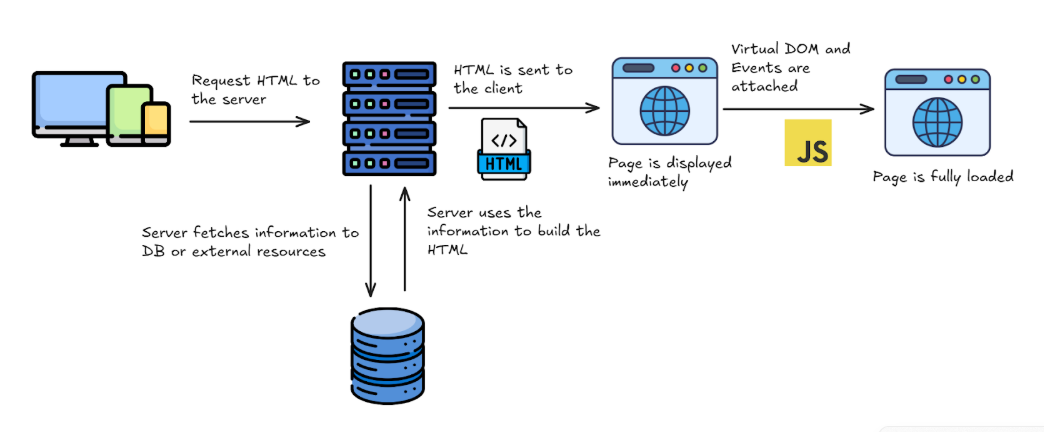
As the user reaches some page (for example, assume the user navigates to the products page), the browser will hit the server on the corresponding route. After such a request, the server will start building the page on its side: it will render the components, fetch the necessary data from APIs or databases, and, finally, it will put it all together by generating the final HTML.
As previously mentioned, all this process will happen exclusively on the server side, so at this point, no response has been sent to the browser yet.
Once the full HTML is generated, the server will send the response to the client, including the HTML code with preloaded data and links to JS/CSS assets.
As a consequence, the user immediately sees content after the server’s response, and ReactJS then “hydrates” the app by attaching event listeners and making the page interactive.
Why Use Server-Side Rendering?
If you ask for the short answer, it enhances performance, SEO, and user perception. But let’s break down these items into a more detailed explanation:
1) Faster First Paint
Given that the HTML code is fully sent by the server, the user sees real content faster, even before the JavaScript code is executed. This creates a smoother experience, which is crucial in low-end devices or slow networks.
2) Better SEO
Rendered HTML is used by search engines to index the results. For a web application built purely with CSR, indexing bots may fail to execute part of the JavaScript code, leading to missing content and, therefore, poor SEO. SSR guarantees that crawlers see your full page instantly.
3) Improved Social Sharing
Many social media platforms, like Facebook, X, or LinkedIn, fetch page data to display preview information when a link is shared. They do that by using some rendered code known as OpenGraph tags. Using SSR ensures those tags exist in the first load, so the information can be provided.
4) Perceived Performance
SSR’s immediate visual response reduces bounce rate. Even if the total load time isn’t dramatically lower, users feel the app is faster than when using CSR.
Optimizing Use Cases for Server-Side Rendering (SSR)
SSR isn’t a silver bullet. As we stated above, it works better when SEO and first render are key constraints, for example, in a marketing site or a blog. Also, it could be used for some apps in which the data changes per URL, such as in an e-commerce product page (in this case, SEO is also important).
On the other hand, if you’re building an internal app, such as a Dashboard behind a login page, maybe CSR could be a better approach. Same for other applications that require authentication, are mostly made from dynamic content, or where SEO is not relevant.
Finally, in some cases, you may consider a mixed approach with partial SSR (for example, in case you have to develop a SPA with heavy client interaction). In this case, you can use frameworks such as Next.js or Remix) that combines hybrid SSR plus hydration.
Server-Side Rendering vs. Client-Side Rendering
Let’s consider the pros and cons of each of SSR and CSR:
Client-Side Rendering
- Pros: Rich interactivity, simple hosting (static files).
- Cons: Blank screen before JS loads, weaker SEO, more CPU on the client.
Server-Side Rendering
- Pros: Immediate content, SEO-friendly, predictable initial state.
- Cons: More server load, complex caching, and slower navigation after the first page.
📌 Hybrid Approaches
Modern frameworks use “hydration” or “partial rendering” to combine both worlds — e.g., Next.js, Remix, Nuxt.js. These systems prerender on the server, then rehydrate interactive components on the client.
Performance Optimization with SSR
As SSR improves the initial render, it adds CPU and memory pressure to your server. In order to mitigate such an effect, a balanced SSR app should implement some strategies, such as caching and streaming.
HTML caching implies storing in cache the HTML rendered by the SSR server for those routes that change infrequently (like product or blog pages). Some tools like reverse proxies (Varnish, NGINX) or in-memory caches (Redis) can store prerendered HTML.
React 18 introduced streaming SSR, allowing HTML chunks to be sent progressively. In this case, the user sees parts of the page earlier while slower components load in the background. For example:
// Example: React 18 streaming API
import { renderToPipeableStream } from "react-dom/server";
app.get("*", (req, res) => {
const stream = renderToPipeableStream(<App />, {
onShellReady() {
res.statusCode = 200;
res.setHeader("Content-type", "text/html");
stream.pipe(res);
},
});
});One of the main advantages of this technique is the improvement of the Time To First Byte (TTFB) for large pages.
Finally, some frameworks like Next.js can combine SSR with caching per route — rebuilding pages periodically instead of on every request.
Server-Side Rendering Benefits and Trade-Offs
In order to decide whether to use an SSR architecture to build your app, it’s important to have in mind what the main benefits of such an architecture are.
The first reason to choose SSR is SEO optimization. By this time, you already know that search engines will get full HTML instantly, improving the way they index your site. Another good reason is performance, which results in a faster perceived load for users in the first render.
Having the page fully loaded on the server also makes meta tags visible to crawlers, improving social sharing. Finally, accessibility is also improved as screen readers can parse static HTML without JS.
Now we have already talked about the benefits of SSR, let’s consider some drawbacks. First of all, it’s worth mentioning that each request triggers rendering logic on the server, which could increase the server costs. In addition, implementing an SSR architecture could add complexity to your system, because in some cases it may require building pipelines for both client and server bundles. Moreover, as caching should be implemented in order to reduce server costs, it must be carefully managed, particularly when distinguishing between dynamic and static routes.
Finally, a potential drawback is that although the content appears quickly, the page might not be fully interactive immediately. This is because “hydration” — the process that makes the page interactive — occurs after the initial content is displayed, resulting in a brief delay before users can fully interact with the site.
Common SSR Frameworks
Let’s have a look at the most popular Server-side rendering frameworks that offer you the possibility of creating a web application by using such a technique. The first one was already mentioned: Next.js. This framework is built on Node.js and based on React, and it offers hybrid SSR plus static generation, making it Ideal for React developers.
If you need to deal with several dynamic routes, you might consider Remix. It improves the efficiency of data fetching thanks to the use of server loaders and includes several features that provide a better developer experience (for example, built-in routing, error handling, and simplified data management).
Vue developers might consider Nuxt.js, the leading SSR framework, which offers features like auto-code-splitting for performance improvement. If you prefer Svelte, however, you can utilize SvelteKit, which is Svelte’s SSR-first platform designed with edge deployment in mind.
Finally, there are some emerging tools that push “islands architecture” — partial hydration to optimize SSR output. Examples are Astro, Qwik, and SolidStart
Server-side rendering frameworks differ in how they split rendering work between server and client, but the basic principles of pre-rendering the initial page on the server remain the same.
When Not to Use SSR
We already discussed the pros and cons of SSR. So, at this point, having an SSR architecture adds complexity to your application. That being said, here are some cases in which you might avoid it:
- If the app runs entirely behind authentication (dashboards).
- When SEO is irrelevant (internal tools).
- If you rely on heavy client-side interactions (drag-drop, canvas).
- Whenever you can generate static content ahead of time (blogs → here you might use SSG).
For these cases, CSR or hybrid rendering (CSR after static shell) is simpler and cheaper.
Future of SSR in React 19
Server-side rendering (SSR) has been available in React since its early versions. Specifically, improvements to SSR were included in the v0.4.0 release notes in July 2013, which introduced APIs like React.renderComponentToString for generating markup on the server.
While SSR has been a core part of React for a long time, the capabilities and features related to Server-side rendering have significantly evolved, especially with the introduction of React Server Components (RSC) in React 19. Server Components let part of your component tree run on the server and stream HTML progressively. By reducing the bundle size and caching of static sections, Server Components can help improve the performance of your app.
How Professional Teams Use SSR
Companies offering custom front-end development services often adopt SSR in high-traffic or SEO-sensitive projects. Common strategies include the sharing of the code between server and client to achieve consistency in apps combining CSR and SSR (Universal Rendering), as well as the reuse of shared layouts that are injected with dynamic data for each use case.
Another technique involves deploying rendering servers globally (i.e., in several regions). By doing this, each end user could be routed to the server that is closest to the user’s location, reducing latency. Finally, having good monitoring by the use of APM tools to track SSR latency and memory use.
By following these practices, development teams can ensure that SSR delivers measurable value instead of just theoretical speed.
Conclusion
SSR is nothing but returning to fundamental web development principles, but enhanced with modern technology. Unlike early Single-Page Applications (SPAs), which moved all logic to the client, SSR establishes a balance by merging the efficiency of the server with client-side interactivity.
Ultimately, picking between Client-Side Rendering and Server-Side Rendering really comes down to what your project needs most. Things like how complex it is, if it needs to scale, how important SEO is, and the overall speed will all play a part in that final call. The good news is, if you decide SSR is the way to go, tools like Next.js and Remix make implementing React Server-side rendering super easy without having to build all that infrastructure yourself.
If your team is seeking to migrate to an SSR architecture to achieve performance upgrades, working with experienced partners in custom front-end development services ensures the right mix of SSR, caching, and modern React patterns. The result: a faster, more discoverable, and more reliable SSR website that delights both users and search engines.